yeke.io · docs
Permissions and RBAC
Kubernetes RBAC determines what each user can do. YEKE maps users to cluster identities. This guide covers identity rules, personal bindings and limited permissions.
The model: two questions, two places
Confusing these two produces the most expensive mistake in this area.
YEKE answers: who?
Which Kubernetes identity a YEKE user reaches the cluster as. Written on the identity screen.
Kubernetes answers: allowed to do what?
What that identity may do to which resource in which namespace. With Role, ClusterRole and their bindings, in the cluster.
  YEKE user                   YEKE identity mapping           apiserver
  ─────────                   ─────────────────────           ─────────
  dana (role: admin)   ──►    Impersonate-User: dana@…   ──►   RBAC decides
                              Impersonate-Group: yeke:cluster-admins
No request ever goes out under the agent's own identity. The agent is a carrier; it adds an impersonation header and the apiserver decides. This is not a configuration choice but an invariant enforced in the type system: a request without an identity cannot leave core.
The identity screen
Cluster → Identity. Requires administrator rights.
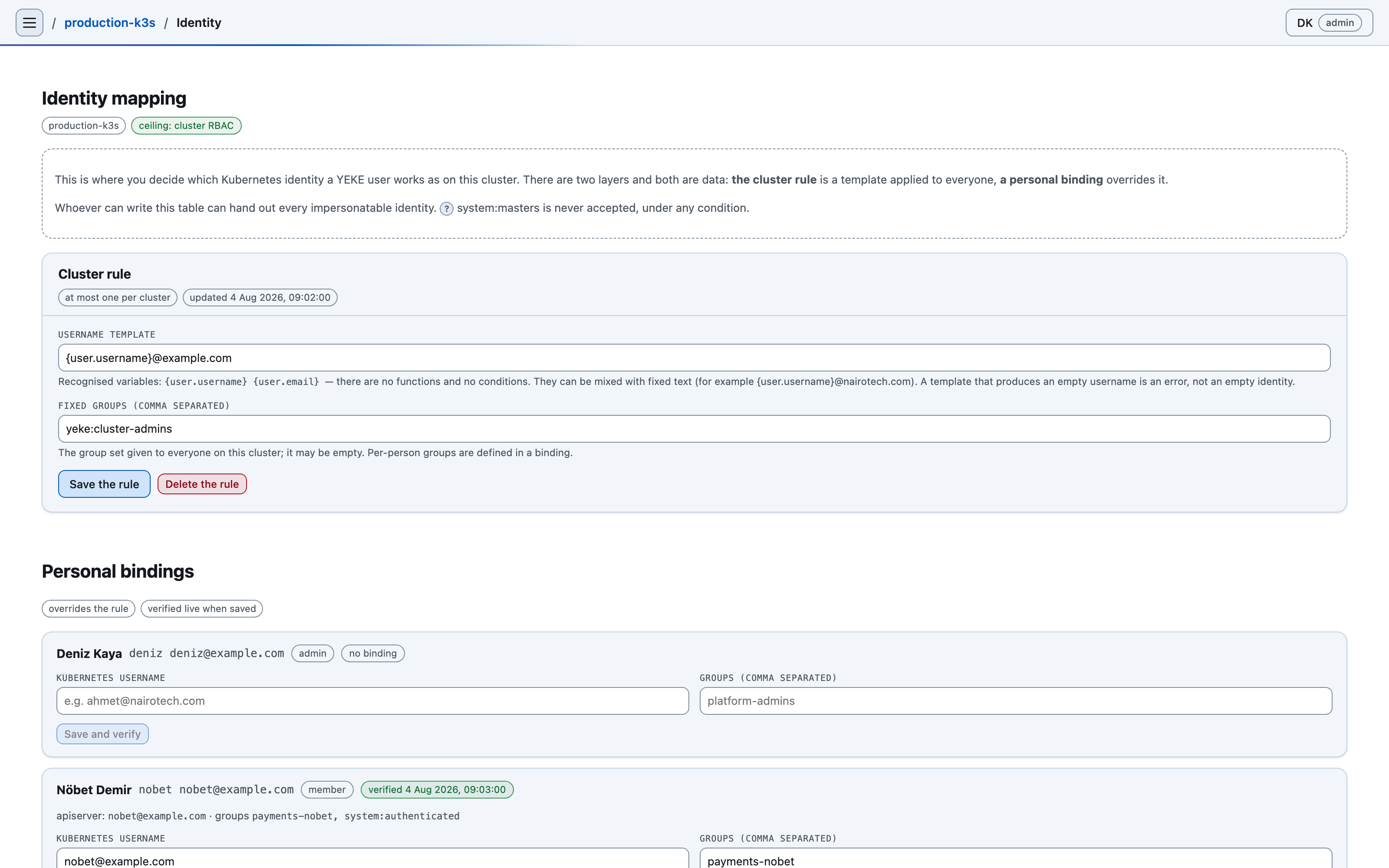
Rule and personal binding
Two layers, and both are data.
The cluster rule — everyone
A template plus a fixed set of groups. The template understands exactly two variables,
{user.username} and {user.email}; there are no functions and no
conditionals.
username template :  {user.username}@example.com
fixed groups      :  yeke:cluster-admins
There is at most one rule per cluster.
A personal binding — one person
It overrides the rule and is independent of that person's YEKE role: change the role and the binding still stands. When you save it, YEKE asks the apiserver and shows the answer in the row; so a mistyped name surfaces at save time, not at the first operation.
Whoever can write a binding can hand out every identity that can be
impersonated. The screen says so plainly. One exception: system:masters is
refused under all circumstances — rejected separately on the YEKE side and in the generated
agent manifest.
If you'd rather define an access set once instead of binding it to many people one by one, see Permission groups: a pre-selected set of capabilities is built in the UI, scoped to namespaces, and turned into RBAC in the cluster with one button.
Example: narrow access
Goal — the on-call engineer may scale Deployments in the
payments namespace and do nothing else.
1Write the RBAC in the cluster
YEKE does not do this step, deliberately: permission is the cluster's own record, and a compromised YEKE must not be able to widen it from the outside.
apiVersion: rbac.authorization.k8s.io/v1
kind: Role
metadata:
  name: payments-oncall
  namespace: payments
rules:
  # Reading, so the list can be seen at all before anything is scaled.
  - apiGroups: ["apps"]
    resources: ["deployments"]
    verbs: ["get", "list", "watch"]
  # Scaling goes through the SUBRESOURCE; `update` on `deployments` is NOT
  # granted, or the image, env and probes would become editable too.
  - apiGroups: ["apps"]
    resources: ["deployments/scale"]
    verbs: ["get", "update", "patch"]
  # Reading pods, to see the result (optional, but needed in practice).
  - apiGroups: [""]
    resources: ["pods"]
    verbs: ["get", "list", "watch"]
---
apiVersion: rbac.authorization.k8s.io/v1
kind: RoleBinding
metadata:
  name: payments-oncall
  namespace: payments
subjects:
  # This name must match the binding you write in YEKE, character for character.
  - kind: User
    name: oncall@example.com
    apiGroup: rbac.authorization.k8s.io
roleRef:
  kind: Role
  name: payments-oncall
  apiGroup: rbac.authorization.k8s.io
kubectl apply -f payments-oncall.yaml
2Write the personal binding in YEKE
Cluster → Identity → that user's row:
| Field | Value |
|---|---|
| Kubernetes username | [email protected] — character for character the same as subjects[].name in the RoleBinding. |
| Groups | Not needed here; the binding names the user directly. |
Press Save and verify and the identity the apiserver returned appears in the row. If it does not, something did not take — either the name is misspelled or the impersonation ceiling does not cover it.
3Check the ceiling
If the agent runs in restricted mode, the impersonable names are limited to the list baked into the manifest. To use a new name it must be added there and the manifest reapplied. In full mode there is no ceiling on usernames; to use a new group, however, the manifest still has to be regenerated.
Verify by measurement, not by assumption: sign in as that user and attempt a
write in a namespace other than payments. The expected result is the plan being
refused by the apiserver.
YEKE roles
YEKE has two roles: admin and member.
| Role | Inside YEKE | In the cluster (agent, full mode) |
|---|---|---|
admin | Users, audit trail, identity screen, adding and removing clusters, hooks. | Maps to the yeke:cluster-admins group, which the install binds to cluster-admin. |
member | Admin screens are closed. Can still build a write plan — the refusal comes from the apiserver. | Maps to yeke:cluster-viewers: read-only, and cannot read Secrets. |
A role change takes effect immediately: there is no second record, the identity is resolved from the current role on every request. A user with a personal binding is unaffected.
Who is the second approver? — dual approval (Enterprise)
No third role; the approver set is derived from the identity rule already in place.
When a policy requires requireSecondApproval, eligible approvers are recalculated. An approver must be active, have an identity mapped on the cluster and differ from the plan owner. requiredApproverGroup, if set, also requires membership in that group. The YEKE admin role is not required. If no approver is eligible, the plan shows a warning when created. Dual-approval details →
The "Grant access" button
A narrow recovery path — not a tool for narrowing permissions.
In direct mode, if the kubeconfig identity is recognised by the apiserver but bound to no role at all, a button appears. Pressing it makes YEKE build a plan, and that plan creates exactly one object:
ClusterRoleBinding/yeke-kubeconfig-user
  subjects: [ User/<the kubeconfig user> ]
  roleRef:  ClusterRole/cluster-admin
- Only in direct mode. It never appears in agent mode.
- Only for administrators, and the endpoint runs the same gate independently.
- It goes through the approval card at a raised bar: you are asked to type the resource name. YEKE's own button is not exempt from YEKE's own guardrail.
- What it grants is
cluster-admin. If you want to narrow access, the path is the example above, not this button.
Limits
Limits of the authorization model.
- YEKE has no namespace or resource ACL. Do not go looking for a "let this user see only that namespace" setting — that decision belongs to Kubernetes and its answer is RBAC.
- YEKE does not write RBAC into your cluster. The single exception is the button above: one object, a fixed name, direct mode only, and only through an approval.
- Guardrail policies tighten, never loosen. They can stop a plan but they cannot grant anyone anything; they are not a replacement for RBAC.
system:masterscannot be granted by any path. Two separate gates refuse it.- The agent's own role carries no write verb. Read, discovery and impersonation; no
secrets.
Connect your approval process
Kubernetes RBAC answers "is this identity allowed to do this". Whether it should happen right now — is there an open change record, are we in a maintenance window — is a question only the outside can answer, and that is exactly what hooks are for.